


If you’ve been online for the past few years, you’ve probably experienced an interesting phenomenon. Those small black and white pixel squares are popping up everywhere, from cafe tables and product packaging to digital billboards and event tickets. QR codes have become one of the simplest yet impactful marketing tools ever!
But what if we told you, QR codes today are much smarter than QR codes of yesteryear? They can track scans, collect analytics, be edited at any time, and represent your brand identity?
Welcome to QR Meta, a next gen QR code generator built for businesses, marketers, and content creators who want more than just a scannable QR code.
In this guide, we will walk you through everything from registration to tracking your first campaign, and learn how to turn a simple link into a smart, dynamic QR code to increase engagement and results.
Why QR Codes Matter in 2025
Before we talk about QRMeta , let’s set the stage.
By 2025, QR codes have moved way beyond restaurant menus and payment links. They have become a way to connect a physical experience to a digital experience allowing companies to instantly make a printed touchpoint into an interactive experience.
Whether it’s:
- A retail brand linking to exclusive offers on product packaging.
- A restaurant that provides digital menus and instant payments.
- A marketer tracking campaign performance instantaneously.
- Or a small business that allows customers to scan to follow to social media.
QR codes are now one of the most inexpensive and trackable ways to connect with audiences in real time.
And this is where QRMeta comes in offering a modern and intelligent way to make, manage, and measure your QR campaigns all in one platform.
Step 1: Register on QRMeta
Visit QRMeta.io and click “Sign Up”.
It is quick and involves no technical setup. Just enter your email, create a password, and within a few seconds you will be in the dashboard.
You will find a clean and modern interface whether you are a beginner or a pro. The dashboard will provide you with:
- Create QR Code – this is where the magic happens
- My Codes – this is your library for all of the QR codes you create
- Analytics – this is the performance overview
- Team & API – for businesses that need to scale
Everything is clearly labeled, so even if this is your first time creating a QR code, you will have no issues finding your way around.
Just think of it like your QR code command station – easy, organized, and ready to make your marketing smarter.
Step 2: Learn About Static vs Dynamic QR Codes
Before you hit the Generate button, we want to make sure that you understand the difference between static and dynamic QR codes.
Static QR codes:
- The destination link is fixed.
- Once it has been generated, it cannot be changed.
- There are no analytics or tracking.
- Best for permanent use cases (example: wi-fi login code).
Dynamic QR Codes
- The link can always be modified at any time.
- You can monitor data like location, timing, what device was used and how many times in total it has been scanned.
- Offers advanced performance analytics and campaign modification.
- Maximizes opportunities for marketing, advertising or any opportunity that changes over time.
Pro tip: Go dynamic. If you ever think you will be changing a link or want to track performance, make sure to use a dynamic qr-code so you have that flexibility.

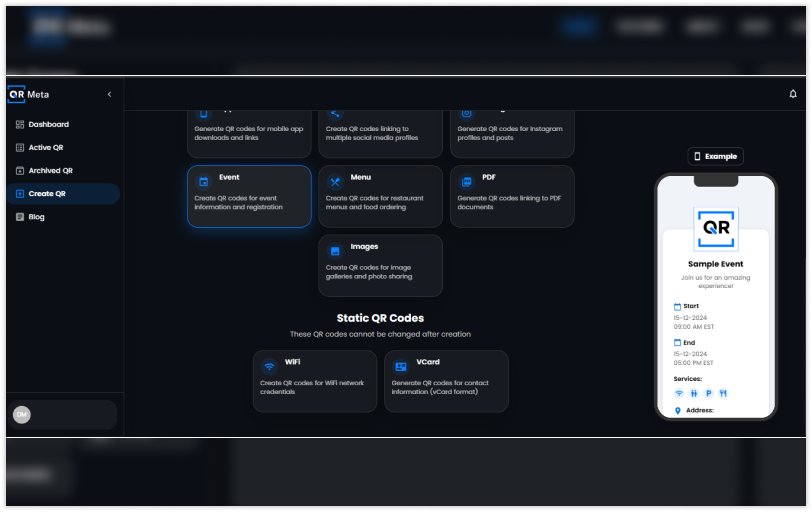
Step 3: Determine What You Want Your QR Code to Do
QRMeta supports multiple types of content. You can create a QR code for:
- A website or landing page
- An app or product link
- A contact form or phone number
- A payment page
- A business profile or social page
Just add the link and you are ready to design.
Example: If you’re an owner of a café you can link directly to your digital menu. If you’re a freelancer you can link directly to your portfolio. There really are endless options, and that is what makes QR codes such a universal tool.
Step 4: Personalize Your QR Code Design
This is where QRMeta truly excels – in personalization. It is a thing of the past to only have boring, black-and-white QR codes. With QRMeta, you can personalize your QR in style through:
- Colors and gradients
- Patterns and eye shapes
- Frames and CTAs
- Logos or images in the center
Want your QR to match your brand’s color? Easy peasy. Want it to pop, like on packaging or on a poster? That’s easy too!
Besides looking more professional, a custom QR code generates trust and improves scan rates. Just be sure your color contrast is good, as dark QRs scan best on a light background.
Step 5: Generate and Test Your QR Code
Once you have the design you want, click Generate.
QRMeta will deliver, and the QR code will be instantly created for you – sharp, high-quality, and ready to download in multiple formats (PNG, SVG, or PDF).
But before you go and use this on everything, test it.
Use your smartphone camera to scan and confirm:
- The link opens correctly
- The link is mobile responsive
- It loads quickly
Remember, most QR scans are conducted on the mobile phone, so the landing page for your
QR code also has to look good on the mobile device!
Step 6: Monitor Your Scans and Assess the Data
This is where QRMeta truly shines. Each dynamic QR code provides real-time statistics so you can see the exact performance of your codes.
Here is what you can see:
- Total scans
- Distinct users
- Geolocation (in city, in country)
- Device type (iPhone, Android, and Desktop)
- Timing and frequency of scans
These details will change the game for marketers. No more guessing about which flyer or campaign brought people to you. You’ll know.
Data will convert simple QR codes into powerful marketing tools.
For example, if most of your scans come from one area or occur at a certain time of year, you’ll be able to modify your campaigns to work to the strengths of your data – optimizing for performance, not bias.
Step 7: Scale Your Campaigns
Now, once you’ve created a few QR codes and now that you know how to use the analytics and what they mean, it’s time to scale.
QRMeta has sophisticated features, including:
- Bulk QR code generation for product packaging or event passes.
- API access, that allows you to integrate QR generation right into your website or CRM
- Team collaboration, where your colleagues can login on one account and manage campaigns together, or one person explicitly managed a single campaign
- Link management that assists and organizes updating multiple dynamic QR links.
So now you can see, the QRMeta app will not only allow you to generate a QR code but also allow you to longitudinally manage QR codes with all the features and benefits.
Real-World Applications of QR Code

Let’s explore a few practical examples of how organizations could implement QRMeta:
1. Retail & E-commerce
Apply a QR code to your product packaging that connects to either reviews, loyalty rewards, or how to/tips videos.
2. Restaurants & Cafe’s
Link a digital menu or customer course feedback forms with a QR code so that each time your menu changes you do not have to reprint menus.
3. Events & Conferences
QR codes can be used for check-ins, digital tickets, schedules, and interactive schedules.
4. Agencies & Marketers
Personalize a branded QR code that is trackable and serves your client campaign interest utilizing analytics to track ROI.
5. Service & Real Estate
Attach a QR code to a “For Sale” sign or business card that directly links the potential lead to your listing or booking page.
Why QR Meta is not just another QR Generator
Of course, there are tons of QR Code tools out there but QRMeta is built for the growth-focused user. Here is why QRMeta is the tool for commercial use for your business:
- Real-time analytical data
- Scalable for Team or Enterprise
- Sleek Design Options that Keep with the Brand
- Edit Dynamic Code Anytime
- Easy to Use Dashboard
- Secure and Fast
In the end: QRMeta provides you with all the ways to create a simple code to back-end management of a full QR code marketing strategy.
The Future of QR Codes
As we transition deeper into a digital world, QR codes will only become more integrated into our marketing, logistics, payments, and customer experiences.
With the assistance of AI-powered analytics and dynamic QR technology, Qrmeta is leading the charge and changing QR codes from a static scan to an interactive measurable experience.
If your brand does not use QR codes already, 2025 is the year to begin using QR codes.
Final Thoughts
Creating a QR code used to be as simple as creating a black square – now it is about creating connections.
With Qrmeta , you aren’t just creating a code, you are creating a branded trackable link between your audience and the message.
So go ahead : sign up, create your first dynamic QR code, test it out, and track it.
Watch how one scan can lead to new opportunities for the business.
FAQs
1. Is QRMeta a free service?
You can indeed start for free and upgrade as you go for advanced features.
2. Can I see how many people scanned my QR code?
Yes! QRMeta provides analytics in real-time for every dynamic QR code.
3. Can I change the destination link after I create the code?
Yes! That is the advantage of dynamic QR codes. You can edit and update links anytime you want.
4. Can I add a logo and change colors on the QR code through QRMeta?
Yes! You can customize and personalize your QR code to align with your brand.
5. Do QR codes expire?
No, with static QR codes so they don’t expire. And with dynamic QR codes, they don’t expire as long as your plan is active!




