


QR codes are now an everyday item for everyday people and provide immediate access in our quest for information on the internet through scanning QR codes as we browse the web. Instead of searching, users simply scan the QR code and have access to the digital content in seconds.
The rise in popularity of QR codes is due to their ease of use and many possible applications. A QR code can be scanned from any device without the need for application downloads. QR codes can store any type of information about a person or business. Students, entrepreneurs, and others who want to promote their online presence all find that QR codes are useful.
Additionally, anyone can create a free QR code by using an online generator or QR code generator without any special technical skills or design knowledge. With a little time and effort, a person can quickly create a QR code and share it immediately. Let’s check it out!
What are QR Codes?
Quick Response codes, also known as QR codes, are two-dimensional codes containing data that can be scanned quickly by digital devices. QR Codes were designed to allow for immediate access and reading of the data stored in the code via scanning by digital devices. This differs from standard barcodes that only hold a limited amount of information with respect to product identification.
How do QR Codes Work?
When a QR code (or a quick response code) is created for free online with a QR Code Generator. You are required to add information into the database on the website such as URL, or text. Once the code is scanned, the device scanning the QR Code will decode the pattern of black and white blocks into a usable action, such as going to a website or making a new contact in your device.
Many individuals will create QR Codes for simple and permanent information. Some examples of common uses for a free static QR Code include:
- A URL to a website
- A digital business card
- Social media profile
If this information is not going to change regularly, creating a free Static QR Code would be useful.
QR Codes Vs Standard Barcodes
Barcode systems, as they exist today, are designed to read only one type of code format and they require specific barcode reading devices to read them. QR Codes on the other hand:
- Stores a much greater amount of data as compared to standard barcodes.
- Can be read from any angle or access point.
- Can be scanned using everyday smartphones.
Hence, the overall practicality of QR Codes compared to standard barcodes for modern digital use is superior.
Devices that Scan QR Codes
Today, QR codes can be scanned using:
- Smartphones (iOS and Android cameras)
- Tablets
- Laptops with webcams
- Dedicated barcode scanners
Because of this wide compatibility, QR codes have become a universal tool for sharing information instantly.
Common Uses of QR Codes
QR codes can be used in a variety of ways, both personally and professionally. With the help of a free custom QR code generator, you can create a QR code that is unique to your needs.
QR Codes for Personal Use

QR codes are a valuable tool for everyday use and connecting with others.
Website URL Sharing
Instead of typing out a long web address (URL), you can create and share a QR code for that web address, allowing others to scan the QR code to go directly to your web page. This is particularly useful for sharing portfolios, blogs, and personal projects.
Wi-Fi Connection
A Wi-Fi QR code can be created to hold your Wi-Fi name (SSID) and password, allowing guests to connect to your Wi-Fi network without having to enter anything manually. This is perhaps the most common use of a static QR code generator.
Saving Contact Information
You can create a QR code that contains your contact information, allowing others to save your contact information to their phones. Many people use this as a digital business card, even for personal purposes.
Sharing Social Media Profiles
Another personal use of QR code technology is to share your social media profiles with others. At events or social functions, you can create QR codes that others can scan to access your Instagram, LinkedIn, or other personal profiles.
QR Codes in Large Businesses And Professional Areas
QR codes are low-cost, effective ways for businesses to connect with their customers.
Marketing and Advertising
To direct consumers to websites, promotions, or landing pages, many companies place QR codes on ads and posters as well as product packaging. For businesses to create a QR code for use in their marketing, it allows brands to establish a direct connection between their offline audience and the online world instantly.
Restaurant Menus
As the use of digital menus spread across many countries, many restaurants and other food service establishments have taken advantage of the ability to use QR codes, which are still the best option available for clean and convenient access to digital menus. Most restaurants use a static QR code free option for their menus. It works well in restaurants where menu items will remain the same over time.
Event Promoters and Ticketing Providers
QR codes help streamline the check-in process at events and reduce the use of paper for tickets and promotional materials.
Product Packaging
Businesses use QR Codes on product packaging to provide instructions, tutorial videos, product information, etc. Some brands prefer to create a dynamic QR code free solution when the content can change regularly, making it more efficient for businesses with multiple products to keep track of.
Business cards and Flyers
Companies can use QR codes for their business card and flyer promotions. They can create a QR code for their company to link the QR code to a website, contact details and an online catalog This approach keeps companies’ promotional materials clean while also allowing them to provide more information to customers electronically.
Ways to Create a QR Code for Free
Creating a QR code does not require advanced technical knowledge. It is actually so easy and quick! Using an excellent free QR code generator makes it possible to create, personalize, and use a QR Code in a matter of minutes. Here is how to make a QR code the correct way and in a step by step way.
Step 1: Find a Good Free QR Code Generator
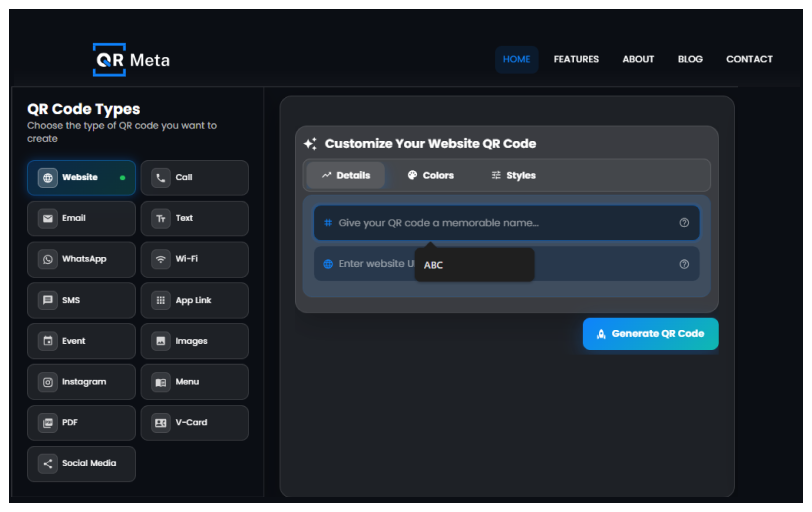
The first thing to do is find a quality QR code generator that lets you create QR codes for free without hidden fees.
Here are some things to consider when searching for a quality QR code generator:
- You can create free QR codes on their website without having to sign up for anything.
- Clearly state if the QR code is going to be static or dynamic.
- Offer basic customization options.
- Provide high-resolution downloads for printing.
Most users who want a permanent QR code that does not expire and does not require payment for keeping it live will prefer a static QR Code Generator.
Step 2: Select QR Code Type
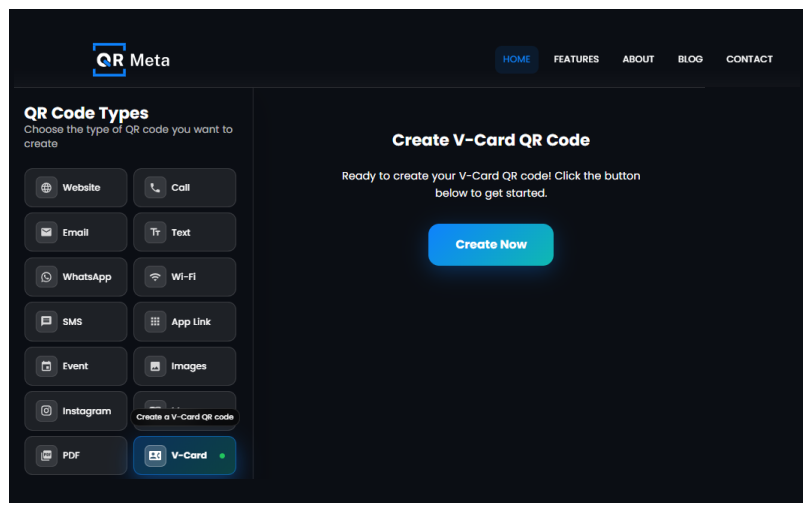
The next step is determining how the QR code you create will work. The majority of QR code generators allow you to create the QR code for multiple functions. The most common qr codes include:
- Website URL – start a web page immediately.
- Text-display a short text message.
- Email – open an email draft with a predefined address.
- Phone Number – initiate calling with one touch.
- Wifi Access – connect the individual automatically to a network.
- File/Document Link – share a PDF, menu or brochure.
QR codes can usually be generated for free for the links, contact information, and stored documents with a static QR code generator.
Step 3: Type in Your Information

Next, you’ll need to put your content into the template. Proper Formatting of the “URLs”.
- Always remember to include: ‘https://’ if you’re sending a link.
- Ensure that the URLs load properly from Mobile Devices.
- Avoid sending shortened or broken links.
Verify Spelling and the Associated Link:
QR codes do not automatically correct mistakes. A single misspelled letter can cause the scan to fail when trying to use a completely free static QR code.
Be Cautious of Security Issues:
Only send links to verified trusted sources.
Do not use the QR code for links that contain sensitive personal info.
Be Prominent in Brand Reference When Designing QR Code:
If you intend to create a QR code for your business brand, it is critical that the link be synonymous with your brand.
Step 4 : Customize your QR code
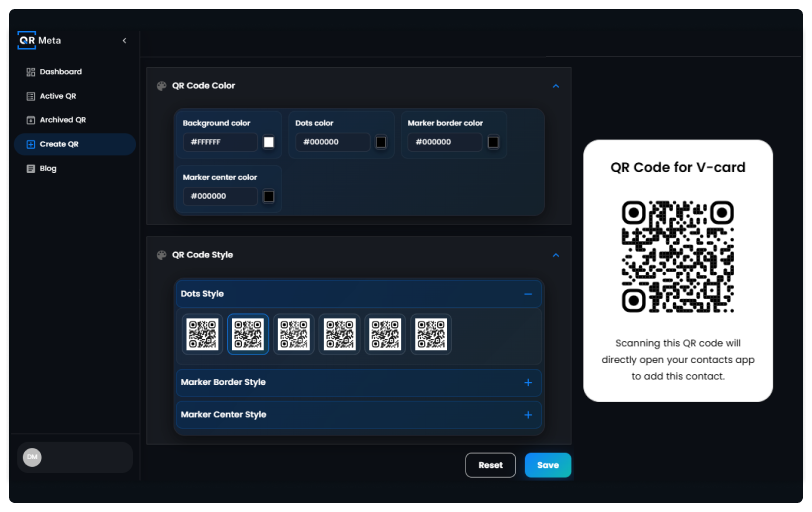
Customization is not a requirement. However, customizing your QR code will usually lead to your QR code being noticed. The main reason you will want to customize is to build or promote a brand.
Customization Options
Many different platforms allow you to easily create a QR code that you can customize for free, including the following :
- You can change the colour.
- You can place your logo in the QR code.
- You can change the shape of the corners or edges of the QR code.
- You can change the background colour or contrast.
Customization Works Best For
- Building a brand or a marketing campaign.
- Having a QR code on a business card or flyer.
- Creating a QR code for a free digital business card.
Customisation Works Worst For
- Using too many colours that do not have enough contrast.
- Making the QR code too decorative.
- Shrinking the QR code too small.
In all instances, the most important aspect of creating a QR code is to make sure it is readable or scannable, regardless of the customizations you apply to your code.
Step 5 : Generate and Download your QR Code
After everything looks good, click the “Generate” button, and your QR code will then be available!
File Format Options
Most tools will allow you to generate three different file format types :
- PNG – Best for websites and social media.
- SVG – Ideal for printing and resizing.
- JPG – Good for general digital use.
File Format Selection Tips
- Use SVG files for posters, banners, or other printed products.
- Use PNG files for email correspondence, website use, and PowerPoint presentations.
If you are creating a QR code for a business, choosing the correct file type for your QR code will provide you with professional-looking codes, no matter where you use them.
Step 6: Testing QR Code
QR codes can be tested by scanning using an iPhone or android device.
- Different lighting conditions.
- Try scanning from different distances.
That’s it!
Best Practices for Making Effective QR Codes
1. High Contrast Colors
Choose a dark QR code pattern against a white or light background; this combination is easiest to scan with most QR code readers. High contrast generates QR codes that have greater reliability, mainly when using free online QR code generation services.
2. Make Sure QR Codes Are Large Enough to Scan
When creating your QR code for business use on printed materials, ensure you make the code large enough for the user to scan with minimal effort. When using free online QR code generation, do not make the codes too small.
3. Leave a Sufficient “Quiet Zone” Around The QR Code
Leave a blank buffer zone around your QR code. This space is essential for scanners to recognize the QR code properly. Don’t place text, images, or other borders close to the QR code when using a free online QR code generator.
4. Avoid Curved or Reflective Surfaces
Place your QR codes on flat, matte surfaces as much as possible; curved or shiny materials can distort your QR code and will make scanning accuracy less reliable, even when using free online QR code generators.
5. Make Sure To Include a Clear Call-To-Action
Give users a reason to scan your QR codes by including simple actions such as “Scan Me” or “Scan Here To Learn More”. A clear and simple call-to-action will improve user engagement with both business and marketing QR Codes.
Final Words
A QR code is an incredibly simple but effective way to connect the physical world with the digital one. Anyone can create a qr code online and customize it to their liking to share it with confidence at no cost.
Using a reliable QR Code Generator, selecting the right QR Code type, and adhering to best practice guidelines for sizing, contrast ratios, and testing ensures that your QR Codes may be scanned reliably regardless of the device from which it is scanned. For businesses that want to share a website, menu, contact information, or create a QR Code for their business, using a static free QR Code solution is often the most dependable and economical option available.
With the use of a free QR Code Generator, generating QR codes that are scannable and professional looking for personal or business purposes has never been easier.
FAQs
1. What is a free source to print/create QR Codes on the Internet?
The internet has many resources available for creating/printing your own QR Code (short for Quick Response). With the use of a QR Code generator, you will be able to produce a QR Code at no cost.
You can choose a QR Code generator that suits your needs, pick the type of QR Code (URL, text, email, Wi-Fi, etc.) you would like to create, insert your content and produce your QR Code. Many of the QR Code generators on the internet allow you to create QR Codes online for free without signing up for an account or paying for anything.
2. Can I have my own QR Code?
The answer to this question is yes! When you create a static QR Code using a QR Code generator, you own your QR Code. You can download your QR Code and use it on any of your marketing materials (manuals, posters, etc.) or for electronic media. The QR Code you create through the use of a static QR Code generator will be yours forever, as long as you save the QR Code file.
3. Are QR Codes free?
Yes, QR Codes can be obtained for free. There are many QR Code generator services that offer QR Codes free of charge. Free QR Code generator sites usually have static QR Code generators that will generate QR Codes for you that will be good for all of your QR Code’s contents for an indefinite time, and they will provide dynamic QR Codes for you on a free trial basis so that you can create editable QR Codes.
5. Do QR Codes expire?
Static QR Codes do not have an expiration date. When you make a free QR Code using a static QR Code generator, that QR Code will never expire.




