

QR codes have generally become part of people’s lives today without anyone noticing.
They are found in almost every aspect of everyday life including providing information and how to pay for items at stores using digital wallets as well as logging into applications or displaying tickets to events.
Most of the time all that’s needed is to position your phone so the camera can see the QR code and then wait a few moments for it to recognize the QR code and work.
However, some QR code scans take much longer than expected to complete due to difficulties with either how the phone was oriented to the QR code or poor quality of the QR code itself.
If you have ever had difficulty scanning a QR code or if you have ever had issues scanning a QR code, you are not alone.
This blog post will provide you with a breakdown of the things that cause an issue when trying to scan QR codes, and how you can resolve these problems. Let’s jump into detail!
How QR Code Scanning Works?
To find out what’s going wrong, it is useful to first understand how everything got started. There are four steps to scanning a QR code:
- First, your phone’s camera takes a photo of the QR Code.
- Next, the QR reader app sees the square design and scans it for size.
- The third step is to detect alignment markers.
- Finally, the QR reader app decodes the data that is contained in the QR Code.
All four steps take place in milliseconds if everything is the way it’s supposed to be.
However, when there are small interruptions or changes to what’s normal, they can result in scanning problems or delays before a scanned QR code is recognized.
Common Reasons That You Might Be Having Problems with Scanning QR Codes
Let’s take a look at some of the main reasons that you may be having difficulty scanning a QR code, or that the QR code is taking too long to be recognized.
1. The Location of the Light Source

Lighting can have a bigger effect on how successfully a QR code will scan than many people think.
Is it too dark? Then your camera will not be able to find the contrast.
Is there too much light? Glare can wash out the QR code.
Is the light uneven? Shadows might cover part of your QR code.
For example, if you are scanning a QR code on a shiny poster when the sun is shining on it, then the QR code will not be able to be read because of the reflections from the sun.
Thus, when scanning QR codes, always try to scan them in even lighting, as natural daylight is the best source of driver for this process!
2. Low Contrast QR Code Design
QR Codes are made up of a pattern of dark and light blocks. If the contrast has been reduced, then it will make it much harder to scan.
For example, if there is a light block on top of a light block; or, if there is a dark block on top of a dark block; or, if there is a gradient or an artistic design.
Any of these types of designs can create severe problems when attempting to scan a QR code.
When QR codes are branded, they often look great. However, if the code is not designed properly, then these codes can also create significant QR code scanning accuracy problems!
3. Blurry Camera or Unfocused Camera
Sometimes, it is not the QR code that is the problem; sometimes, it is the camera that cannot find the QR code.
Common reasons why a camera may not be able to find a QR code:
Dirty camera lens.
Shaky hands.
Autofocus delay.
Even the slightest bit of blurriness.
4. Small or Distant QR Codes
In order to be scanned, QR Codes need to have enough information to be recognized.
If they are:
Too Small
Too Distant from the Phone’s Camera
Printed with Low-Resolution
Then, they will probably have difficulty being scanned, especially on older devices. This is one of the most common reasons why there is a QR Code that cannot be scanned.
5. Damaged or Distorted QR Codes
QR Codes are extremely durable. However, they are not indestructible.
There are three situations that commonly cause problems when scanning and decoding QR Codes:
- A portion of the code becomes scratched or damaged.
- The surface of the QR Code is round, curved, or irregular.(i.e., it’s on a bottle, can, etc.)
- The QR Code is wrinkled or creased.
When these scenarios occur, the QR Code will experience scanning problems/decoding failures. Thus, always use a clean, flat, and undamaged QR Code when scanning/decoding.
6. Complex or Data-Laden QR Codes
There are many different types of QR Codes, and they all differ in size and complexity.
A straightforward URL creates a clean QR Code. However, as data is added to a QR Code:
- The pattern of the QR Code becomes denser.
- The square’s size will decrease and become more difficult to see and identify.
Because of this, it will be harder to read a QR Code compared to a QR Code with a comparable amount of data in it when viewing it with a low-resolution camera.
7. Device Limitations
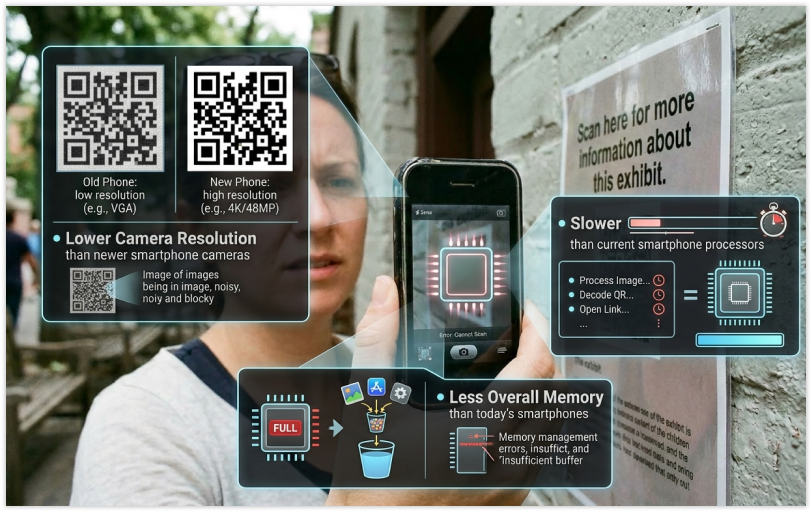
The ability to scan a QR Code depends heavily on the camera quality of the smartphone being used.
Some of the factors affecting the camera quality of older smartphones include:
- Lower camera resolution than newer smartphone cameras.
- Slower processing speed than current smartphone processors.
- Less overall memory than today’s smartphones
8. Problems with the Application or Software
The fault isn’t necessarily with the physical QR cartridge scanner itself; rather, there are a number of issues that may be arising when using a particular application.
- Outdated Image Capture/Application.
- Slow/device-specific scanner.
- Bugs or glitches in the program.
For these reasons, there is a chance for a problem or delay in reading a QR Code’s detection.
9. Confusion With the Internet
There are some misunderstandings associated with scanning and loading:
Scanning is called decoding, this happens instantly when scanning
Loading how long it takes to access the website is dependent on how fast/slow your service is. So, when the person scans a QR Code and it is taking longer than expected to watch the desired website load, the person will think that there’s a problem with decoding the actual QR Code. Be sure to test your internet connection prior to blaming your issue on the QR Code!
Effects of the Environment on The Scanning of the QR Code
If every other aspect is functioning as it should, there are still environmental issues many are not aware of when trying to Scan a QR code.
- Walking/moving (while scanning a QR code)
- Flickering screens (TVs, monitors, etc.)
- Shadows that are falling across the QR Code.
- Reflections from glassy surfaces.
All of the above have the potential to hurt how you Scan QR Codes!
Common Design Mistakes That Affect QR Code Scanning
Creating QR codes? Understanding these common design mistakes is incredibly important.
1. Over-Customizing
Adding logos and other creative elements to the QR code is a trendy thing to do, but it’s a risky move. When you cover a portion of the QR codes or alter the shape of the squares or add artistic effects, this can significantly affect the ability of the QR code to be scanned.
2. Missing Quiet Zone
A QR code requires a white area around the outside of it known as a “quiet zone”. Without this region, a scanner is not able to distinguish between the QR code and surrounding text. This causes an issue where the scanner cannot read/recognize the QR code.
3. Not Printing Properly
Printing quality of the QR code is just as important as creating the original QR code. Low-quality prints those that are “jaggy”, bleed in color or faded in appearance
will negatively affect scanning ability.
How to Fix QR Code Scanning Issues?
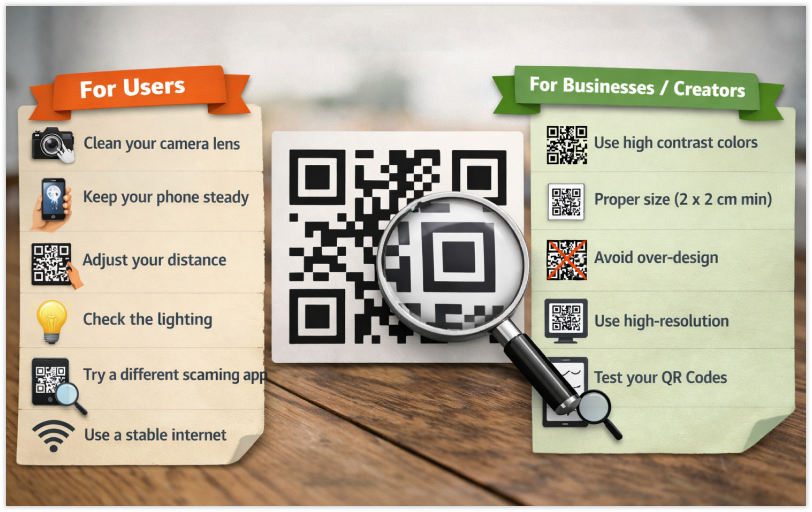
Now that you understand some of the common issues, here are some practical solutions for you!
Users
If you have a QR code that you are trying to scan and it is not scanning, try these fixes:
- Clean your camera lens.
- Keep your phone steady.
- Change your distance to the QR code.
- Check for and adjust the lighting conditions.
- Try a different scanning app.
- Use a stable internet connection.
Businesses/Creators
If QR codes are not working for users, then there are a number of ways to fix that:
- Use high contrast colors.
- Maintain proper size. (at least 2 x 2 cm when printed)
- Don’t over-design the QR code.
- Use high-resolution images.
- Test.
Final Thoughts
QR codes are intended to enhance the user’s life. However, a QR code that will not read quickly can lead to a frustrating experience for the user. Instead, it is usually multiple factors contributing to, such as poor light, lack of contrast, code design, camera limitations, and environmental factors.
If a user understands how to be successful when they have a problem reading a QR code, they will be more successful at troubleshooting the issue. A user may need to adjust their phone position or lighting or clean or wipe the camera lens. Small steps can make a significant difference in reducing the difficulty of reading a QR code and improving its overall performance.
Businesses and creators have another layer of responsibility because a poorly designed QR code can cause scanning issues, reduced user engagement, and missed opportunities for the business. By ensuring proper contrast, code size, code quality, etc. QR codes will be scanned correctly and will improve the user’s ability to scan the QR code successfully.
As technology continues to develop and improve, QR code scanning difficulties will continue to decrease. Good design practices and user awareness will always play an important part in the success of seamless scanning.




