


QR codes are meant to make access instant. Scan and go, that’s the promise.
But in reality, many users still face a common problem: the QR code doesn’t scan.
In most cases, the issue isn’t the scanner or the device. It’s the design. Small, often overlooked decisions can create major QR code readability problems and lead to failed scans.
Understanding these mistakes is essential if you want your QR codes to work consistently across devices, lighting conditions, and real-world environments.
Why QR Codes Fail to Scan?
QR codes work by encoding information into a pattern of contrasting modules. Scanners detect these patterns, alignment markers, and spacing to decode the data.
When any of these elements are disrupted, it leads to:
- QR code not scanning
- QR code scanning issues
- Inconsistent performance across devices
Most failures are not technical, they are design-related.
1. Poor Color Contrast
One of the most common reasons behind QR code scanning issues is low contrast between the code and its background.
What goes wrong:
- Light colors on light backgrounds
- Heavy gradients or faded tones
- Brand colors used without testing
Why it matters:
Scanners rely on clear contrast to distinguish data modules. Without strong contrast, the code becomes difficult to read.
Best practice:
- Use dark foregrounds on light backgrounds
- Avoid gradients unless fully tested
- Ensure visibility in different lighting conditions
Poor contrast is a leading cause of QR code color contrast issues and failed scans.
2. Incorrect QR Code Size
A frequent QR code size problem is making the code too small for practical use.
What goes wrong:
- Shrinking QR codes to fit tight layouts
- Ignoring scanning distance
- Using the same size across all formats
Why it matters:
Smaller QR codes reduce detail, especially when storing longer URLs or complex data.
Best practice:
- Minimum size: 2 x 2 cm for print
- Increase size for longer content
- Adjust size based on viewing distance
If the size is incorrect, it often results in QR code not scanning at all.
3. Over-Designing the QR Code
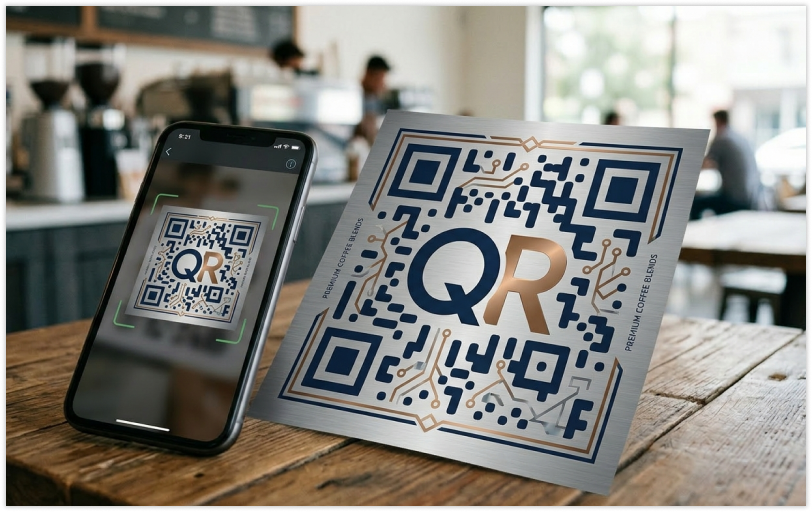
Customization can improve branding, but excessive design leads to QR code design problems.
What goes wrong:
- Large logos covering key areas
- Decorative elements replacing modules
- Altering structural patterns
Why it matters:
QR codes have error correction, but it is limited. Over-design reduces the scanner’s ability to recover missing data.
Best practice:
- Keep logos within 20–30% of the code
- Avoid modifying essential structures
- Prioritize usability over aesthetics
Many QR code readability problems are caused by over-customization.
4. Not Enough Space Around the Code
The quiet zone is the empty space around a QR code. Ignoring it is a critical QR code design mistake.
What goes wrong:
- Placing QR codes too close to text or graphics
- Cropping margins
- Using busy backgrounds
Why it matters:
Scanners need clear boundaries to detect the QR code. Without proper spacing, detection fails.
Best practice:
- Maintain at least 4 modules of margin
- Always include a clean white border
- Avoid clutter around the code
This directly impacts QR code readability and scanning accuracy.
5. Low Resolution and Poor Quality
Low-quality QR codes are a major cause of QR code scanning issues.
What goes wrong:
- Exporting low-resolution images
- Scaling up small QR codes
- Using compressed formats
Why it matters:
Sharp edges are essential for scanners. Blurry or pixelated codes distort the data pattern.
Best practice:
- Use vector formats like SVG or EPS
- Maintain at least 300 DPI for print
- Avoid resizing after generation
Poor quality is a common reason for QR code not scanning in real-world scenarios.
6. Inverted or Problematic Color Schemes
Creative color choices can introduce QR code contrast issues.
What goes wrong:
- Light QR patterns on dark backgrounds
- Neon or reflective colors
- Low-contrast combinations
Why it matters:
Not all scanners handle inverted or unconventional designs reliably.
Best practice:
- Stick to dark-on-light combinations
- Test inverted designs across devices
- Avoid reflective surfaces
Improper color usage often explains why QR code is hard to scan.
7. Poor Placement and Environment
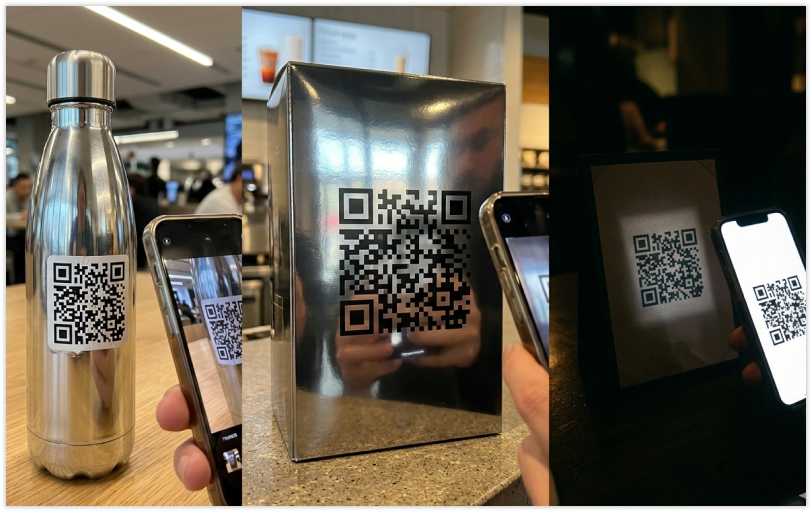
Even a well-designed QR code can fail due to environmental factors.
What goes wrong:
- Placement on curved surfaces
- Reflective or glossy materials
- Poor lighting conditions
Why it matters:
Environmental conditions affect how cameras capture the QR code.
Best practice:
- Use flat, matte surfaces
- Ensure proper lighting
- Test in real-world conditions
These factors contribute to QR code scanning issues beyond design.
How to Make a QR Code Easier to Scan?
To avoid common QR code design mistakes, follow these principles:
- Use high contrast colors
- Maintain proper size
- Avoid excessive customization
- Preserve the quiet zone
- Use high-resolution formats
- Test across devices and environments
Consistency and testing are key to eliminating QR code readability problems.
Conclusion
QR codes are simple, but they are highly sensitive to design decisions. Small mistakes like poor contrast, incorrect sizing, or missing spacing can make a QR code completely unusable.
Most QR code design problems are preventable. By focusing on clarity, usability, and proper testing, you can ensure your QR codes scan quickly and reliably every time.
Platforms like QRMeta focus on both design flexibility and performance, helping reduce scanning failures while maintaining visual consistency.
FAQs
1. How to make a QR code easier to scan?
Use high contrast, proper sizing, and minimal design. Always test before publishing.
2. Why is my QR code not scanning?
Common reasons include low contrast, small size, poor resolution, or missing quiet zone.
3. What is the ideal QR code size?
At least 2 x 2 cm for print, but larger sizes improve scanning reliability.
4. Can QR codes be customized safely?
Yes, but within limits. Avoid altering core structures and keep logos small.




