

QR codes have become a well-known part of our daily digital lives. From paying instantly or quickly to a store or online, connecting with a website or event ticket for free, they’re a helpful way of quickly connecting both worlds of digital and physical. A QR code contains encoded information that can be read quickly with a QR code reader or an image scanning app on a mobile device.
There are many different ways that QR codes can now be scanned throughout everyday life. The success of using a QR code to complete an action greatly depends upon the effectiveness of the QR Code to be scanned successfully. If a QR code fails to scan properly, then the individual scanning may become frustrated, and abandon the intended action being completed. It is extremely important that a QR code is able to be scanned reliably in order to maintain a positive user experience. Let’s explore!
How QR Code Scanning Works?
A QR code works by storing information in a grid of small black-and-white squares called modules. The arrangement of the modules creates a unique pattern to represent encoded data which can be a URL, text, or payment information.
When a user scans a QR code, using either an online QR code scanner, a mobile QR code scanner, or a dedicated QR code reader to do so, the following steps occur:
1. The smartphone camera captures the QR code as an image.
2. The QR code contains three large squares in the corners of the QR code pattern, which are called finder patterns. When the scanner recognizes these squares, it can quickly identify that the image contains a QR code and will be able to read it.
3. The QR code also contains small alignment patterns in the image that help the scanner properly determine the orientation of the QR code and correct for any distortion that may have occurred if the QR code is scanned at an angle.
4. Once the structure of the QR code is recognized by the software, it will decode the QR code pattern into digital data, such as a website link or a payment request.
In most cases, the entire scan process occurs in less than one second if the QR code is in the best possible conditions for scanning.
How QR Code Scanners Perform Using the Camera?
The other significant contributing factor is the camera and software used for decoding the image, which both will determine the performance of QR code scanning.
Key Factors Include:
Smartphone Camera Resolution
QR codes are scanned more quickly and accurately with higher-quality cameras because they produce clearer images.
Camera Autofocus/Automatic Exposure
Modern cameras typically use autofocus and automatic exposure. If they can’t focus correctly or the exposure is too light or too dark, it may be more difficult for the QR scanner to read the QR code successfully.
Detecting Contrast in the Scanner Image
Contrast between the dark and light modules is important for QR code scanners. If there is not enough contrast in the image, the scanner may not recognize the QR code pattern.
Decoding Algorithms for QR Code Scanner Apps
QR Code scanner apps use advanced decoding algorithms to compensate for distortion, adjust brightness, and allow for QR code detection even in less-than-ideal conditions.
For example, when a user scans a QR code using an Android device, the camera and decoding algorithms work together to quickly identify and decode the QR code.
Importance Of Environmental Factors
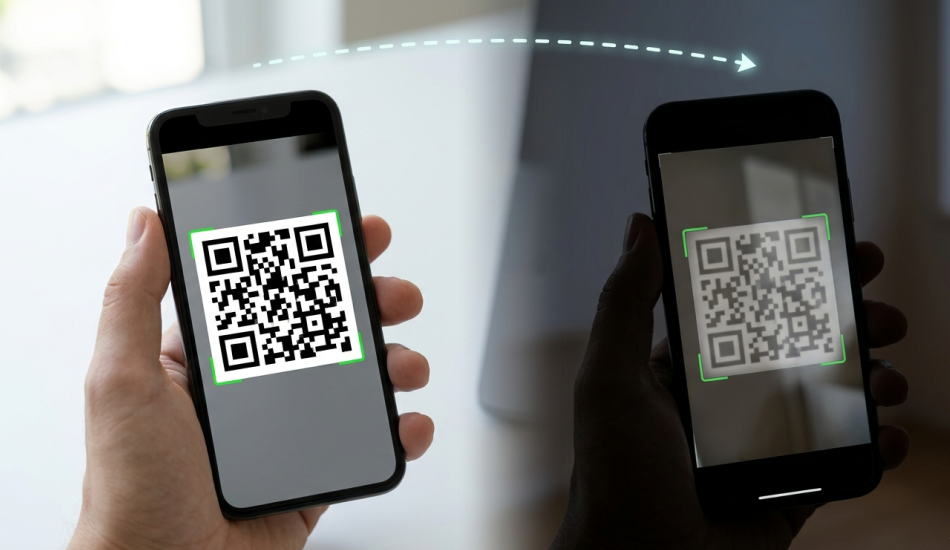
Environmental conditions can play a large part in how well your scanned images are processed, even when you’re using very modern technology.
The way that the camera is able to scan images is determined by two major elements:
- The contrast between black and white or light and dark.
- The focus and resolution of the camera lens.
When lighting conditions create a lower contrast, the chance that you’ll have problems with scanning at the distance that you’re attempting to scan will increase. Therefore, if the QR Code is not scanned well due to low lighting, the QR Code scanner will likely either not read the pattern correctly or will have considerable difficulty reading the pattern.
Having a greater understanding of how lighting impacts your scanned images can mitigate many of these types of issues.
QR Code Scanning and the Effect of Lighting
The effect of lighting on the ease with which a QR code can be scanned varies because the scanners depend on the image’s contrast and clarity. Thus, any lighting condition that will affect visibility can negatively affect the ability to scan a QR code successfully.
Examples of common lighting-related problems include!
1. Low-light conditions
One of the most common reasons QR codes scan slowly or cannot be scanned is an insufficient amount of light.
Problems
The following problems can result from low-light conditions:
- Less contrasting modules (dark and light) will exist.
- More camera noise can cause images to appear to be grainy.
- Autofocus will operate more slowly.
As a result, a QR code reader or QR scanner online will not be able to see the QR code’s pattern and format clearly.
Results
- A longer time period looking for scanning the QR code.
- Multiple attempts at scanning.
- QR code has utterly failed to be scanned.
As a result, many users think that their QR code will not scan when in fact it may have been due to inadequate lighting.
2. Too Bright
Low light isn’t the only condition making it difficult for QR codes to be captured. Excessive light can also hinder QR code capturing.
Issues
Very high light levels can present the following challenges to QR Codes:
- QR code modules may be overexposed and washed out.
- Bright reflections can produce insufficient contrast between black and white portions of the QR code.
- Cameras may have difficulty achieving an exposure balance.
As a result, the QR code’s pattern will be less recognizable to the QR Code scanner.
Results
Incorrectly overexposed QR code conditions may lead to the following:
- Failure to identify edges of QR codes.
- Module reading error.
- Decoding delay.
Typical Situations Where These Problems Occur Include:
- Outdoor billboards in direct sunlight.
- Large advertising billboards.
- QR codes, when printed, on highly reflective surfaces.
- White backgrounds with very bright reflections.
Even when using the best online QR code scanners, exposed images of scanned QR codes may lead to failed scans.
3. Glare and Reflection
When QR codes are printed on reflective material, glare and reflections pose another challenge to scanning QR codes.
Issues
Materials such as plastics or laminated paper that provide glossiness will reflect light directly towards the lens of the camera. This light reflects back off these glossy materials, and depending on the glare, they may obscure some or all of the QR code patterns from view by the QR code scanner.
Rather than capturing the QR code, the QR code scanner captures the bright reflection.
Results:
When glare and reflection occur, the following may happen:
- Finder pattern failure by scanner.
- Partial scanning of QR code.
- QR code’s decoded results are inconsistent.
Effect of Distance on QR Code Scanning
In addition to the role that lighting has to play in successful scanning, the distance between the camera and the QR code of the scan is just as important. Therefore, even if someone uses a high-quality QR scanner or QR code scanner app, the likelihood of this person successfully scanning the QR code will be negatively impacted if they are either too close or too far away from the QR code.
How well the camera is able to capture the QR code’s modules is impacted by the distance between the camera and the QR code. If the camera is unable to focus properly or the QR code is too small because of the distance being too far away from the camera, it will be difficult for the QR scanner to provide a decoded output for the information contained on the QR code.
What is the Optimal Distance for Scanning QR Codes?
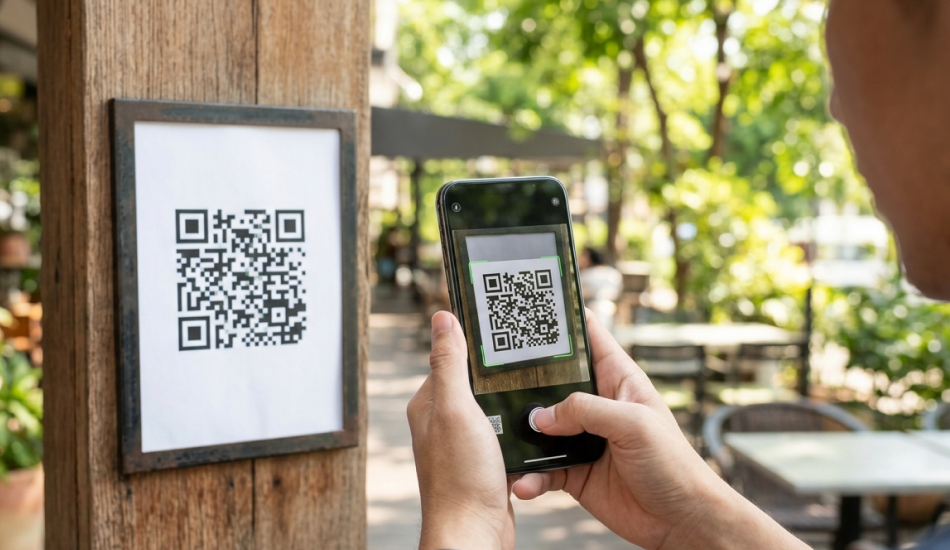
The optimal distance for scanning QR codes is as follows!
Scanning QR Codes Too Close
A common mistake that many people make when scanning QR codes is to instinctively bring their smartphone up too close to the QR code in order to scan it. While this may seem like a good idea at the time, actually scanning from too short of a distance makes it much more difficult to scan QR codes than if this person would have maintained an appropriate distance from the QR code in order to scan it.
Problems Caused By Scanning QR Codes Too Close
When a smartphone camera is scanning a QR code from an extremely short distance, there are multiple problems that can arise when performing this function, including:
Inability for the Camera to Focus
The maximum focusing distance is required by the lens of the camera on the smartphone in order to allow the camera to acquire a focused image of the QR code. When the camera lens is at a distance too close to the QR code, the camera lens cannot acquire a focus of the QR code.
Problems Related To Scanning Too Close And Scanning Too Far
If you scan a QR code too closely, you may have problems with:
- The glare or reflections prevent the scanner from identifying modules.
- The scanner will not completely detect the whole QR code.
- Slow scanning times.
The most common reason a user thinks their code is not working is that they have the camera lens too close to the code.
Scanning at a greater distance from the code until it is clearly in the camera’s view can improve scanning performance.
Scanning from Too Far Away
Problems created by scanning from a distance include:
- A small image of the QR code in the camera’s view.
- Too few pixels are captured in the matrix of each module and thus prevent scanning from occurring due to the limitations of the camera’s ability to discern sufficient details between the colors of black and white.
For QR codes to be read, a certain amount of pixel density must be present in the image for the QR code scanner or QR reader online to understand how to decode the QR code.
If you scan from too far away, you may experience:
- Insufficient pixels to decode the QR code.
- Unable to find the finder pattern.
- Sufficient pixel count for the QR code to be scanned.
These are situations that occur regularly for QR Codes.
Optimal Distance for a QR Code Scan
To provide a general guideline for how large a QR code should be and how far away it can be scanned, designers rely on a rule of thumb known as the 10:1 ratio.
This means that the optimal scan distance is about 10 times larger than the QR code’s width.
For example:
- A 2 cm QR code can be scanned from ~ 20 cm away.
- A 5 cm QR code can be scanned from ~ 50 cm away.
Larger QR codes, such as those found on posters/banners, can often be scanned from several meters away. This rule of thumb should result in the QR code appearing large enough for the QR code scanner’s camera to read it. For example:
- Business cards would have a smaller QR code, which can be scanned at a close distance.
- Retail products would have a medium sized QR code for handheld scanning.
- Billboards would have a large QR code for long-distance scanning.
By incorporating the QR code scan distance into their design, designers create a solution where the majority of users will not have any issues using their Android device QR code scanner or any other smart phone.
Best Practices for Reliable QR Code Scanning
The vast majority of QR codes will not scan if they do not have the correct design, placement and testing. By following a few QR Code best practice examples, you will be able to prevent most QR code scanning problems for users of QR code scanners.
1. Black on White
The QR code should always have a high contrast between the two colors. The best combination is black on white, but other good combinations include red on white, blue on white or purple on white.
Don’t use low contrast colors such as light gray, yellow, pastels and so on as they will prevent the QR code readers/codes from being detected by your QR code scanner.
2. No Glossy Surfaces
When printing your QR code, make sure to print on a matte surface or a non-glossy surface. Any glossy material where the light source is being directed at it will reflect glare and prevent any scanning of the QR code or the QR code reader being able to read all corners of the QR code as well as the centre.
3. Select the Proper Size
Make sure to use the appropriate size for the expected distance from which the QR code will be scanned. For example, at 6 ft away, a QR code printed on a poster or billboard should generally be 1-2 inches wide, but if printed on a business card or box then the QR code should generally be no more than .5-.75 in wide.
4. Adequate Lighting
When placing your QR Code it is important to have sufficient and uniform light to allow the QR Code to be scanned easily. Do not place your QR Codes in bright and/or shiny surfaces that make scanning difficult or impossible.
Final Thoughts
The use of QR codes has become an integral part of bridging the gap between offline and online interactions, whether through payment methods, marketing programs, product information, and check-ins for events. While the success of scanning QR codes will depend on how well a user can achieve a successful scan. It is essential to consider environmental variables that may affect a successful scan.
Environmental variables can include the amount of light available, as well as the distance from which a scanner will scan the QR code. Poor amounts of light, glare and attempting to scan from too far away or too close will create issues with the ability for the QR scanner, QR code scanning app or QR code reader to read the QR code. Often, users will encounter difficulties when attempting to scan QR codes and will have no idea that the environmental conditions were responsible for the failure of the scanner to scan theQR code.
By designing QR codes with sufficient light to support successful scanning and a comfortable distance for scanning to take place, businesses will be able to provide a seamless and efficient experience for the end users and therefore, engage more users with the QR code.
FAQs
1. Is it possible to scan a QR code remotely?
Yes! As long as you have a camera that can see the picture clearly and you have a big enough QR code you can successfully scan a QR code remotely. The distance from which you can scan a QR code depends on the QR code’s size and the camera used to scan it.
2. What is the farthest distance that I can scan a QR code?
The distance from which you can scan a QR code will depend on the QR code’s size and resolution. As a general rule of thumb, you will be able to scan a QR code a distance of roughly 10 times its width. For example, you could easily scan a QR code that has a width of about 10 centimeters (cm) from approximately 1 meter away.




