


“Information is the oil of the 21st century, and analytics is the combustion engine.”
– Peter Sondergaard
The same logic can also be applied to inventory systems that are in use today. Simply put, if you have the most precise and the closest to real-time data about your products, then you can use stock in a much more intelligent way, you can cut down waste, you can improve your turnaround times, and on top of that, you can also upgrade your customer service. However, what if I say there is a simple, doable, and quite reasonable tool that can help you get to that perfect state of just a little way further?
It’s a case of QR codes, not just the small squares that you scan with your smartphones. One can completely revolutionize the way you do inventory tracking, conduct audits, manage warehouses, tag assets, and even partner with digital systems.
Let’s cover the best ways to use QR codes in inventory operations, from printing codes on items to tracking movement to using analytics to make smarter decisions.
How to Use QR Codes Effectively for Inventory Management?
Let’s check in detail!
1. Tag Every Item for Accurate Tracking
The very first point of efficient inventory is categorizing each and every thing that one has and knowing about each of them in detail.
Earlier, this was achieved through barcodes and scanners, which were expensive. But now, QR codes can be created or printed for any item, carton, or pallet and can be scanned by the camera of any smartphone or tablet. As QR codes can contain more information and can be read from different directions. They are perfect for warehouses with a lot of goods and fast-moving environments.
How to implement QR codes for labelling?
- Give each product or SKU a unique QR code.
- Put the code on a sticker or a direct-print label.
- Make the links lead to product details, batch number, storage location, or any other important metadata.
This method changes inventory from a guessing game to a system that is visible and can be confirmed by anyone with a scanner.
2. Use Dynamic QR Codes to Update Information Without Reprinting
One of the biggest game-changers in QR technology is the ability to use dynamic QR codes, QR codes where the content or destination can be updated after printing.
Imagine this scenario:
- A product batch is labelled with a QR code that points to an internal systems page.
- Midway through, the product’s location changes from Warehouse A to Warehouse B.
- Instead of printing new codes for every item, you simply update the destination data linked to that code.
This means fewer reprints, less waste, and instant updates across your entire inventory network.
Dynamic QR codes especially shine in large operations where goods move often, prices change, or product details evolve. Their flexibility makes them perfect for smart warehouses, retail backrooms, and supply chains where conditions aren’t static.
3. Track Scans to Get Insights Into Movement
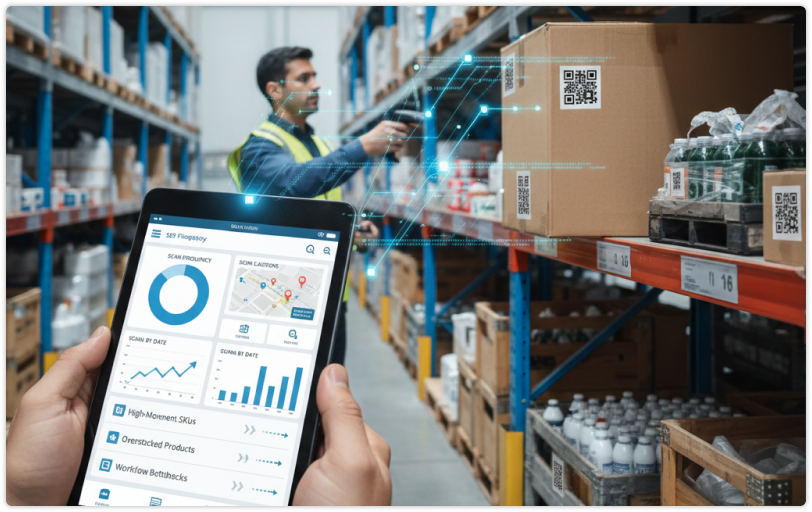
Inventory intelligence isn’t just where items are; it’s also how they’re moving.
Inventory intelligence is not merely about knowing the location of the items but also understanding their movement.
By implementing a QR code system that facilitates real-time analytics and scan tracking, you have the opportunity to gather invaluable metrics such as:
- The number of times each item has been scanned
- The location where the scanning took place (e.g., different warehouses or store locations)
- When it was scanned and by whom
- The device types used to scan it
These metrics enable you to discover patterns. For instance:
- A frequently sold SKU that is continuously changing may require frequent restocking.
- A slow-moving product may be overstocked.
- Items that have been scanned in certain zones may be linked to bottlenecks or workflow issues.
Such an extent of visibility is transforming inventory management from a reactive to a proactive process, which is a great benefit in the rapidly changing supply chains of today.
4. Bulk Generate and Print Labels with Ease
If you’re dealing with large quantities of items, especially with thousands of SKUs, manual creation of QR codes one by one can be a nightmare.
That’s where bulk QR code generation comes in. With features like bulk upload (e.g., uploading a CSV or Excel file), you can:
- Create unique QR codes for hundreds or thousands of items at once
- Customise each code with specific URLs, IDs, or parameters.
- Download all codes in one batch in formats like PNG, SVG, or PDF
This is especially helpful when setting up a new inventory system, rolling out a new product line, or migrating to another database.
Bulk creation isn’t just efficient; it is essential if you’re working at scale. It saves countless hours and ensures consistency across your entire catalogue.
5. Use Analytics to Reduce Stockouts and Overstocks
The main advantage of QR codes, particularly dynamic ones, is their link to the analytics. What you can do is, when scan tracking is turned on, you start asking more intelligent questions:
- What products get the most scans?
- Is it possible that certain items are being scanned and that they are never shipped?
- Are there any scanners or zones that look like bottlenecks?
By having access to this data, organisations can implement intelligent reordering triggers that help them lower the risk of stockouts and ensure that they do not have to bear the costs of the excess stock that consumes their margins. In a world, where a 1% reduction in inventory errors can result in savings of millions, such data-driven insights are very important. Analytics is the “why” behind the numbers, and it helps you to adjust your course very quickly.
6. Link QR Codes With Digital Records
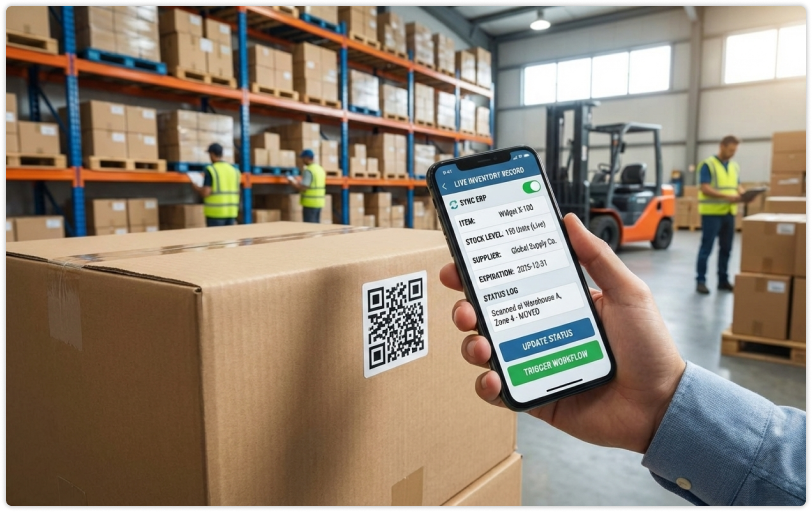
Don’t just stop at printing QR codes; make them part of a digital workflow.
Linking QR codes with online records can amplify inventory workflows in the following ways:
- Scan → Display item details: Make available live stock levels, supplier info, expiration dates, and so on.
- Scan → Update status: Journaling the times when items are moved, inspected, or shipped.
- Scan → Trigger workflows: Getting notifications, updating ERP systems, or collaborating with other instruments.
Inventory management through the use of QR codes as doors to your digital systems is much more than simply “stock checking”; it is becoming an automated ecosystem.
7. Integrate With Existing Inventory Systems
Frequently QR codes are considered a bolt-on, a thing that is added to labels without much thought. However, the intelligent way is to incorporate QR code scanning into your current inventory software.
This could involve:
- Linking the scans to ERP or WMS systems
- Loading the data to accounting or quality assurance tools
- Providing analytics to operational dashboards
By using APIs and integration options that are available for most QR platforms, you can turn QR-enabled inventory tracking into your digital strategy solution for the future, not just a temporary measure.
8. Test, Optimize & Deploy
QR codes are not magic; they perform best when carefully tested.
Before you implement labels in your whole warehouse, consider:
- Testing a small batch in real working conditions
- Determining how easily the staff can scan the codes in low light or small spaces
- Checking how long the codes stay readable when subjected to wear and tear
Testing allows you to identify the issues such as wrong placement, size problems, or printing errors and confirms that your system can reliably support your operations.
Real Uses Across Industries

Here are some powerful real-world uses for QR codes in inventory:
Retail
Track product stock across locations and understand movement trends.
Logistics
Know where each item is at every step of the supply chain.
Manufacturing
Track components, finished goods, and work-in-progress parts.
Healthcare
Organise medical equipment and supplies through the use of accurate labelling.
Education
Put tags on computers, lab equipment, and library resources.
QR codes are used everywhere because they are simple, adaptable, and have more capabilities than people generally think.
Final Thoughts
Implementing QR codes for more efficient inventory management is not about following a trend but rather about accepting the benefits of visibility, accuracy, and data-driven control.
This is the moment when the magic happens, your inventory system becoming transparent whereby every product can be scanned, tracked, updated, and analysed. QR codes are the means through which you make that change, not only from a technological perspective but also operationally, day after day.
If you’re ready to take inventory management to the next level, start with QR codes that are dynamic, trackable, and scalable, and watch how much easier your workflows become.
FAQs (Frequently Asked Questions)
1. What’s the difference between static and dynamic QR codes in inventory?
Static QR codes hold the set of information that is fixed and cannot be changed after they are printed. Conversely, dynamic QR codes allow you to change the location of data or content at any time without the need for reprinting.
2. Can QR codes really replace barcodes?
They can. QR codes are capable of holding more complex data and can be scanned from any angle by a smartphone, which makes them often more versatile than traditional barcodes, especially in complicated inventory systems.
3. Do QR codes work offline?
The code itself can be scanned offline; however, if the content of the QR code is a link to online data (such as inventory details or dashboards), then an internet connection will be necessary to get the real-time updates.
4. How do I start integrating QR codes into my existing inventory software?
Firstly, create unique QR codes for your products, then employ a system that supports scan tracking and API integration to link those scans with your database or warehouse management system.




