

For the past few years, QR codes have slowly but widely been used in our daily routine. It is used in restaurant tables to payment counters to products in stores, to advertisements and business cards. A quick tap of your smartphone camera or QR code scanner gives you immediate access to menus, websites, payment portals and even app downloads.
Have you ever thought about what really happens after you’ve scanned a QR code? What invisible technology becomes active between your phone’s detection of the QR code and opening of either a webpage or app?
While the process might seem straightforward, there’s an interesting set of different types of technologies working in tandem to make it happen.
Here, this article will show you the QR scanning process in detail, step by step, so you can precisely scan a QR code using your smartphone. Let’s explore in detail!
Rise of QR Codes in Everyday Life
The usage of QR codes in our daily lives can be traced to their origins in 1994. The initial purpose of QR Codes was to help the automotive manufacturer track parts on their production line. By scanning the code, the company could quickly see what parts were available for use in the construction of the vehicle.
The use of QR Codes, however, has progressed and evolved into a convenient method for the vast majority of people worldwide to share their digital information quickly and easily to other people.
People can now use a QR reader or their smartphone camera to:
- Make payments using their credit card without needing to carry cash or their wallet.
- View restaurant menus.
- Download applications to their phone.
- Access tickets for events or concerts.
- Connect to Wi-Fi networks.
- Instantly visit a specific page on a website.
Even if someone were to scan a QR Code with an Android or iPhone, or use a QR code online with one of the many tools available for doing so, the process will remain identical.
So, let’s take a closer look at what goes on behind the scenes when we use a QR code!
Step 1: QR Code is Scanned by Your Camera.
Your camera when pointed at a QR code initiates the first step in the process of scanning QR codes.
Many modern smartphones include an integrated QR code scanner in the phone’s camera and do not require a separate app. The camera begins analyzing the QR code as soon as it recognizes the square pattern.
How the phone recognizes a QR code:
A QR code has a unique structure that allows for rapid identification by a scanner. The three primary components of a QR code’s structure are:
- Position Markers: Three large squares to identify the location of the code within the overall design.
- Grid of Black and White Modules: The little squares that comprise a QR code.
- Alignment Patterns: Identical to the scanned image containing the QR code, which allows the QR code to be scanned with accuracy.
The camera’s software uses algorithms based on computer vision technology to identify QR codes. The camera can identify a QR code whether it is slightly blurred, tilted, or partially obscured.
The QR code will be isolated from the background and will be ready to be decoded by the primary camera in just milliseconds.
Although the camera now knows that it is scanning a QR code, it does not yet know what type of data is contained in the QR code.
Step 2: QR Code Gets Decoded
Once the camera identifies the QR code, the next step is decoding the data. This is where the real magic of QR code scanning happens.
QR codes store information using a grid of black and white squares called modules. Each square represents binary data, essentially a series of 1s and 0s.
How Does Decoding Work?
The QR reader scans the grid and converts the visual pattern into digital information. The decoding system analyzes:
- Position markers
- Timing patterns
- Alignment markers
- Data modules
Using this structure, the scanner reconstructs the encoded data.
One impressive feature of QR technology is error correction. Even if a QR code is partially damaged or dirty, the scanner can still retrieve the information accurately.
That’s why you can often successfully scan QR code even when part of it is covered or scratched.
Step 3: Device Understands the Type of Data
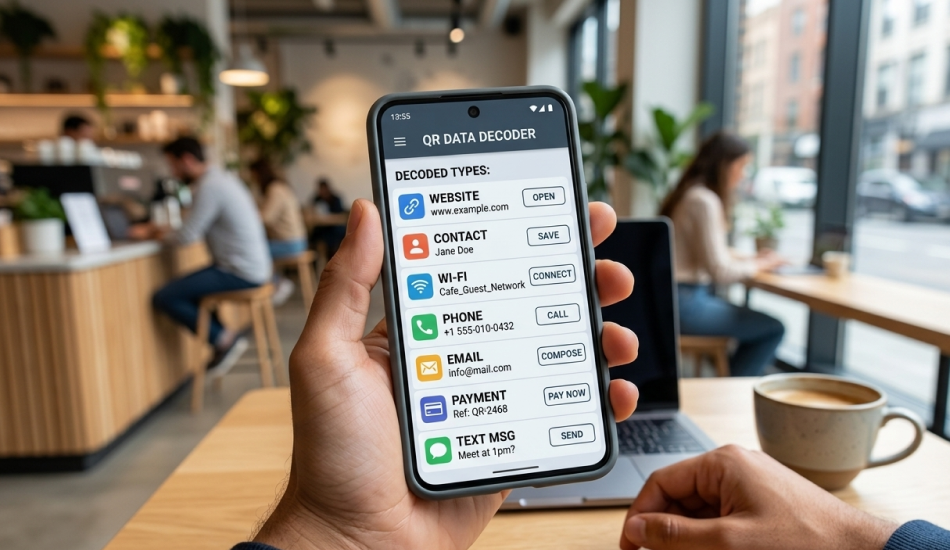
When the smartphone decodes the QR code , it now has access to the raw information . The phone continues to determine how to respond to the information in the QR Code .
There are several types of data that can be stored in QR codes including!
- Website URLs
- Contact information (vCard)
- WiFi credentials such as use of a Wi-Fi network
- Phone numbers
- Email locations
- Payment instructions
- Text messages
The operating system of your smartphone will instantly identify the type of data and suggest an appropriate action based upon what type of data was released by the QR code .
For example,
| QR Code Content | Phone Action |
| Website link | Opens browser |
| WiFi details | Prompt to connect |
| Phone number | Option to call |
| Email address | Open email app |
| Contact info | Save contact |
So when people ask “what happens after scanning a QR code?”, this interpretation stage is a key part of the process.
The device determines the best way to handle the information.
Step 4: If It’s a Link, the Browser Opens
If the information in the QR Code is found to be a link, then a web browser will open .
Most QR Codes are simply web site URLs and therefore your phone needs to connect to the web in order to open the web page.
Here’s how it works if the QR Code is linked to a web page:
The web browser is opened.
The web browser sends a request to the server hosting the desired website.
The web hosting server completes the request.
The content of the selected web page is delivered back to the device.
Most people would think that this is a simple exercise. However, many things are happening behind the scenes on your device
When your device opens the link:
The web browser will do a DNS lookup to get the server address for the specified URL.
A secure HTTPS Connection has been established between your device and the web server.
The web server sends the files for the URL back to the device.
The web browser will render the web page on the screen of your device.
This is what gets done in a few seconds behind the scenes when opening a web site by accessing a QR code.
Step 5: Marketing Tracking and Analytics
QR codes are used in marketing as an effective method to provide easy access and collect valuable insight into consumer behavior.
Today’s QR codes are mostly dynamic, meaning the code redirects users through a tracking server; therefore allowing companies to collect data.
What Types of Data Are Being Collected by Companies?
When someone scans a QR code, the company may gather data on:
- How many scans of the code were completed.
- Where the scans were accomplished.
- What type of mobile device is used to scan the code.
- The date and time of the scan.
- How well an individual marketing campaign performed.
One way for a company to see how customers interact with their marketing efforts would be to place QR codes on:
- Posters
- Packaging
- Billboards
- Booths at events
Tracking how many times a QR code has been scanned, a company is able to see which of their marketing channels are performing the best. As such, QR codes have quickly gained traction as a valuable tool for digital marketing and advertising.
Step 6: Security Checks Happen
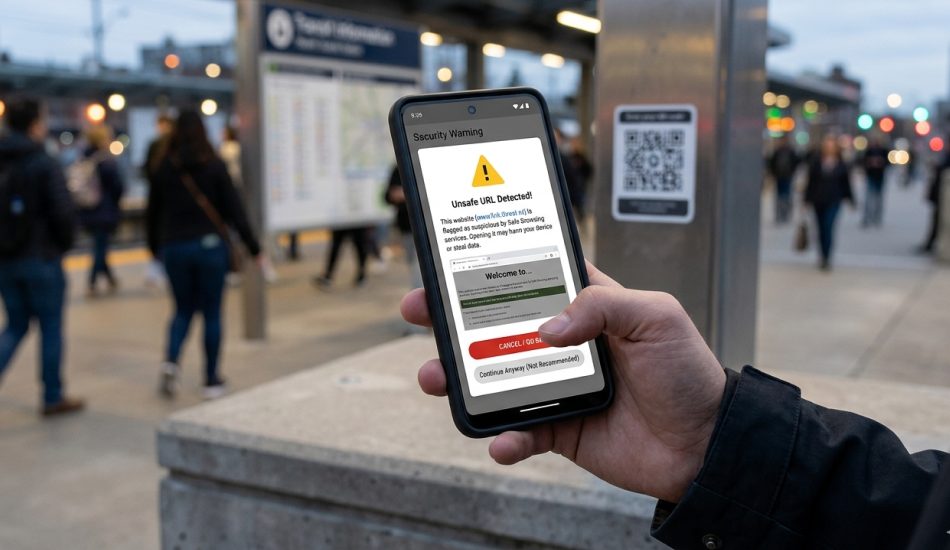
The sixth step in the QR Code Scanning Process is the security check of the QR codes.
QR codes link to external sites; therefore, current smartphones have built-in security features to help keep users safe.
When opening the URL the device can perform some of the following checks to help keep the user safe:
- Check the URL matches what it should.
- Check the URL against safe browsing lists.
- Warn users of possible unsafe URLs.
Sometimes when you scan a QR code, the display of the scanner will show you a preview of what the user is about to open and allow them to determine if they think it’s safe.
Risks
While QR codes are a convenient way to share information, malicious QR codes can be used to direct users to:
- Phishing sites.
- Fake sites to collect credit card information.
- Malicious software downloads.
For this reason, it is recommended that you only scan QR codes from trusted sources. Always verify the end destination before proceeding when using any QR code scanning application.
Step 7: Final Result
The final result shows up on your phone after you’ve followed all the instructions in this post. Depending on the information in the QR code, you may see the following types of content: a web page, a payment screen, a restaurant menu, a business card, a WiFi connection prompt, or a page for an app on your phone.
Scanning a QR code appears to be as easy as pushing a button. Scanning it will actually initiate several different processes on your phone, on many software systems and servers on the internet; that’s the amazing story behind scanning QR Codes.
Conclusion
The process of scanning a QR code may seem simple; just aim your camera at the code and click on the notification that appears on your phone screen.
However, there is a very complex series of technologies that make up this seamless experience: from computer vision to data decoding and through internet access and analytics tracking.
The next time you use a QR code scanner, you will be able to relate your actions to all the many steps and systems involved in making it work.
You may not realize how powerful the small square that makes up the QR codes can be and just how impossible it is for the physical world to talk to the digital world in such a short amount of time.
FAQs
1. What happens after you scan a QR code?
When you scan a QR code, your phone’s QR code scanner reads the encoded data and converts it into an action such as opening a website, displaying text, connecting to WiFi, or initiating a payment. The device automatically processes the information and directs you to the linked content.
2. Can someone steal my information if I scan a QR code?
Scanning a QR code alone usually does not steal your information. However, if the code leads to a malicious website or phishing page, it could trick you into entering personal data, so always verify the link before proceeding.
3. Can you be tracked by scanning a QR code?
Yes, in some cases QR code scans can be tracked, especially when dynamic QR codes are used in marketing campaigns. Businesses may collect analytics such as scan location, time, and device type to measure campaign performance.
4. When a QR code is scanned, what will it resolve into?
When a QR code is scanned, it resolves into the data stored inside it. Most commonly a URL link, but it can also open contact details, WiFi credentials, app downloads, payment requests, or plain text information.




